
250x250
Notice
Recent Posts
Recent Comments
Link
| 일 | 월 | 화 | 수 | 목 | 금 | 토 |
|---|---|---|---|---|---|---|
| 1 | ||||||
| 2 | 3 | 4 | 5 | 6 | 7 | 8 |
| 9 | 10 | 11 | 12 | 13 | 14 | 15 |
| 16 | 17 | 18 | 19 | 20 | 21 | 22 |
| 23 | 24 | 25 | 26 | 27 | 28 | 29 |
| 30 | 31 |
Tags
- css3
- 비전공 개발자
- Animation
- ipad
- 풀스택
- hover
- IOS
- keyframes
- 자바스크립트
- image
- iOS 개발자
- react
- 애니메이션
- 프론트엔드
- xcode
- HTML
- MAC
- front-end
- javascript
- SWIFT
- CSS
- php
- html5
- 비전공자
- button
- iPhone
- effect
- 백엔드
- 개발자
- jQuery
Archives
- Today
- Total
비전공자 개발일기
Text Hover Effect & Shake On Invaild Input 본문
728x90
SMALL
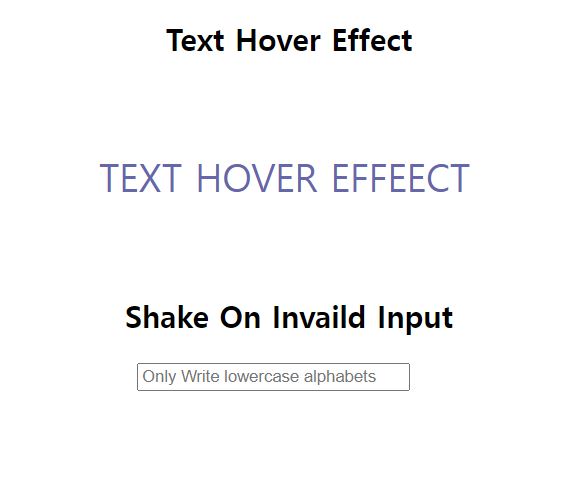
동영상 서비스가 종료되어 해당 콘텐츠를 재생할 수 없습니다.
<!DOCTYPE html>
<html lang="ko">
<head>
  <meta charset="UTF-8">
  <meta http-equiv="X-UA-Compatible" content="IE=edge">
  <meta name="viewport" content="width=device-width, initial-scale=1.0">
  <link rel="stylesheet" href="style.css">
  <title>Shake On Invaild Input & Text Hover Effert</title>
</head>
<body>
  <div>
    <h2>Text Hover Effect</h2>
    <span class="link">TEXT HOVER EFFEECT</span>
  </div>
  <div>
    <h2>Shake On Invaild Input</h2>
    <input type="text" pattern="[a-z]*" placeholder="Only Write lowercase alphabets">
  </div>
</body>
</html>
/* Text Hover Effect */
.link {
text-align: center;
font-size: 30px;
color: #6667ab;
margin: 40%;
line-height: 150px;
background-image: linear-gradient(#ff2f97, #ff2f97);
background-repeat: no-repeat;
background-size: 0 100%;
background-position-x: right;
transition: background-size 500ms;
}
.link:hover {
background-size: 100% 100%;
background-position-x: left;
}
/* Shake On Invaild Input */
input:invalid {
animation: shake 300ms;
}
@keyframes shake {
25% {transform: translateX(4px)}
50% {transform: translateX(-4px)}
75% {transform: translateX(4px)}
}728x90
LIST
'HTML _CSS' 카테고리의 다른 글
| Endless Road Animation (0) | 2022.04.26 |
|---|---|
| Gradient Background Animation (0) | 2022.04.25 |
| Shadow BTN (0) | 2022.04.22 |
| Edge Motion (0) | 2022.04.20 |
| Link Hover Animation (0) | 2022.04.19 |
'HTML _CSS' Related Articles
more


