Javascript
Copy To Clipboard
HiroDaegu
2022. 9. 11. 01:17
728x90
SMALL
<!DOCTYPE html>
<html lang="ko">
<head>
  <meta charset="UTF-8">
  <meta http-equiv="X-UA-Compatible" content="IE=edge">
  <meta name="viewport" content="width=device-width, initial-scale=1.0">
  <title>COPY TO CLIPBOARD</title>
  <link rel="stylesheet" href="style.css">
  <script defer src="main.js"></script>
</head>
<body>
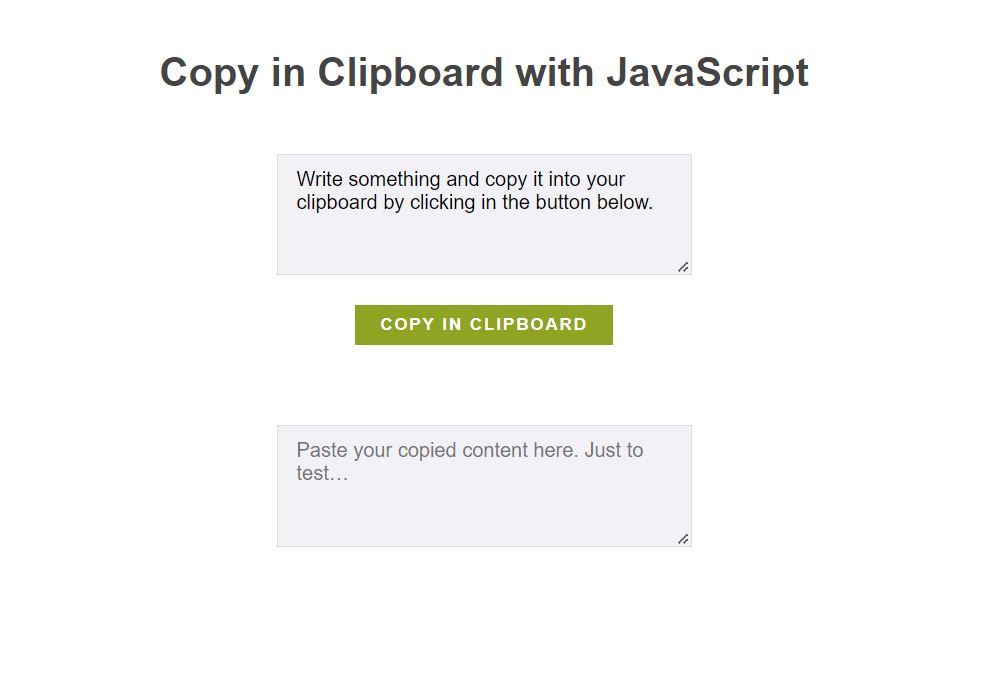
  <h1>Copy in Clipboard with JavaScript</h1>
  <textarea id="to-copy" spellcheck="false">Write something and copy it into your clipboard by clicking in the button below.</textarea>
  <button id="copy" type="button">Copy in clipboard<span class="copiedtext" aria-hidden="true">Copied</span></button>
  <textarea id="cleared" placeholder="Paste your copied content here. Just to test…"></textarea>
</body>
</html>
/* Just to play with animations */
.copiedtext {
position: absolute;
left: 0; top: 0; right: 0;
text-align: center;
opacity: 0;
transform: translateY(-1em);
color: #000;
transition: all .500s;
}
.copied .copiedtext {
opacity: 1;
transform: translateY(-2em);
}
/* Some Generic styles */
body {
text-align: center;
font-family: "Open Sans", Helvetica, Arial, sans-serif;
color: #444;
line-height: 1.6;
}
h1 {
margin: 1.75em auto 1.25em;
}
textarea,
button {
font-size: 1em;
font-family: "Open Sans", Helvetica, Arial, sans-serif;
}
textarea {
display: block;
width: 300px;
max-width: 100%;
height: 75px;
margin: 2em auto 1.5em;
background: #F2F2F6;
border: 1px solid #ddd;
padding: 10px 15px;
resize: vertical;
}
[id="cleared"] {
margin-top: 4em;
}
textarea:focus {
border-color: #8fa423;
}
button {
position: relative;
padding: 8px 20px;
border: 0;
font-size: 0.835em;
text-transform: uppercase;
letter-spacing: 0.125em;
font-weight: bold;
color: #FFF;
background: #8fa423;
transition: background .275s;
}
button:hover,
button:focus {
background: #74861A;
}let toCopy = document.getElementById( 'to-copy' ),
btnCopy = document.getElementById( 'copy' ),
paste = document.getElementById( 'cleared' );
btnCopy.addEventListener( 'click', function(){
toCopy.select();
paste.value = '';
if ( document.execCommand( 'copy' ) ) {
btnCopy.classList.add( 'copied' );
paste.focus();
let temp = setInterval( function(){
btnCopy.classList.remove( 'copied' );
clearInterval(temp);
}, 600 );
} else {
console.info( 'document.execCommand went wrong…' )
}
return false;
} );728x90
LIST